
Web Persephone: Creating a Track Hub
Getting started
A Track Hub is a publicly accessible directory hosted on a server, containing data files in indexed formats as well as some basic metadata. Most of these file formats are designed specifically to be viewed in the UCSC Genome Browser, but many have gained wider adoption. Thus, Persephone can connect to any Track Hub and display the files hosted there (provided they are presented in a format that Persephone understands). UCSC provides an in-depth reference for creating your own Track Hubs; but you can get started quickly by following this simplified guide.
Before creating your own Track Hub, you will need:
- A server to host the files. If you are using the public version of Persephone, the server must be open to the public; if you are hosting Persephone within your organization's firewall, the server only needs to be open to users within your firewall.
- Your data files, converted to one of the supported formats (as described below). UCSC provides pre-compiled binaries for most of the necessary conversion utilities for Linux and MacOS. The easiest way to run these tools on Windows is via WSL, although other options are also available.
- Some metadata files, arranged and formatted as described below.
Preparing the input files
It is good practice to make sure that all of the map names in all of the files are the same. For example, if the chromosomes for your genome are named "Chr1", "Chr2", etc. in the FASTA file (containing genomic sequences), then they must be named exactly the same in the GFF file (gene annotation), BedGraph file (quantitative data), and so on. While Persephone can deal with mis-named maps, doing so will introduce an unnecessary extra step during import.
You may also need to convert some of your input files to indexed Track Hub formats. Most of the convertion tools require an additional "chrom.sizes" file: a tab-separated list containing chromosome names in the first column, and their sizes in the second column. You can auto-generate this file by first converting your genomic sequences to 2bit (as described below), and then running the following command:
twoBitInfo genomicSequences.2bit stdout > chrom.sizes
Here are some of the most common file formats, and the typical command line invocations for their conversion:
|
Purpose |
Input format |
Output format |
Command line |
Comments |
|
Sequence |
FASTA |
2bit |
faToTwoBit in.fa out.2bit |
Hosting sequence files is not strictly necessary (since you can attach your data to external assemblies). |
|
Gene annotation |
bigGenePred |
gff3ToGenePred in.gff3 tmp.gp && genePredToBigGenePred tmp.gp tmp.bed && bedToBigBed -sort -tab -type=bed12+8 -as=bigGenePred.as tmp.bed chrom.sizes out.bb |
bigGenePred is just a 12+8 bigBed file, with thickStart/thickEnd denoting CDS. |
|
|
Gene annotation |
GTF |
bigGenePred |
gtfToGenePred -genePredExt in.gtf tmp.gp && genePredToBigGenePred tmp.gp tmp.bed && bedToBigBed -sort -tab -type=bed12+8 -as=bigGenePred.as tmp.bed chrom.sizes out.bb |
Almost the same as GFF3. |
|
Other annotation |
BED |
bigBed |
bedToBigBed -sort in.bed chrom.sizes out.bb |
BED must be sorted by coordinate. |
|
Read alignments |
BAM |
BAM + BAI |
samtools index in.bam |
No conversion is needed, but the BAI index must be provided alongside the BAM. |
|
Read alignments |
CRAM |
CRAM + CRAI |
samtools index in.cram |
Similar to BAM. |
|
Quantitative |
bedGraph |
bigWig |
sort -k1,1 -k2,2n in.bedGraph > tmp.bg && bedGraphToBigWig tmp.bg chrom.sizes out.bw |
Run only the second half of the invocation if the bedGraph file is already sorted by coordinate. |
|
Variants |
VCF |
VCF.gz + TBI |
bgzip -c in.vcf > out.vcf.gz && tabix -p vcf out.vcf.gz |
VCF must be sorted by coordinate. |
Track Hub directory structure and metadata
The Track Hub is defined by a file called "hub.txt" in the root directory. If the hub contains more than one genome, you should also provide "genomes.txt" listing each genome individually; otherwise, you can list the single genome inline. Either way, each genome resides in its own subdirectory, and is accompanied by "trackDb.txt" listing the available tracks (excluding the 2bit genomic sequence).
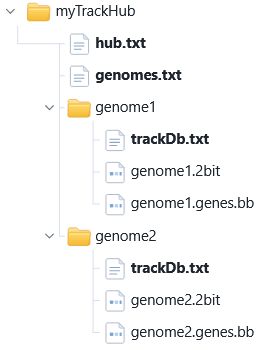
Most of the metadata files will include references to external resources, e.g. detailed descriptions of genomes and tracks (typically in HTML format), and of course the data files themselves. These references may be relative pahts, or absolute URLs. For example, a path like "index.html" refers to a file in the same directory, and a URL like "http://my.intranet.com/data/index.html" refers to a file hosted on some other server.
hub.txt
This file describes the purpose of your Track Hub and its contents. Here's an example file, with inline comments describing each line:
hub arabidopsis_tair12 # unique identifier for the hub (machive-readable)
shortLabel At pangenome 70 # short user-readable label
longLabel Conservation tracks... # longer user-readable description
email scott.tiger@example.com # contact email (will be publicly visible)
descriptionUrl index.html # (optional) path to a file containing the full description in HTML format
genomesFile genomes.txt # list of genomes in this hub
If the hub contains only a single genome, you may specify "useOneFile on" and list the genome and its tracks inside hub.txt instead of providing a separate genomes.txt and trackDb.txt files (described in more detail below):
hub arabidopsis_tair12
...
useOneFile on
genome genome1
twoBitPath genes.2bit
track genes
bigDataUrl genes.bb
...
The "genome" and "track" stanzas must be preceded by blank lines.
genomes.txt
This file lists all of the genomes available on this hub (separated by blank lines). Only the "genome" and "trackDb" lines are required; the rest are optional. For example:
genome Abd-0 # unique identifier of the genome; typically, the subdirectory where this genome's data is stored
trackDb Abd-0/trackDb.txt # list of tracks for the genome
twoBitPath Abd-0/Abd-0.2bit # (optional) path to the genomic sequence file for this genome
organism Arabidopsis thaliana # (optional) organism name (may be the common name such as "thale cress")
scientificName Arabidopsis thaliana # (optional) scientific name of the organism
description Abd-0 ecotype # (optional) long description of this genome
genome Altai-5
...
This example file lists only some of the common properties; consult the UCSC documentation for more information about additional fields.
trackDb.txt
This file typically resides in a genome's subdirectory, and lists all tracks for the genome (separated by blank lines).
track Abd_0_genes # unique identifier of this track
type bigGenePred # data tyoe if this track; must be one of the recognized formats (see above)
bigDataUrl Abd-0.genes.genes.bb # path (or external URL) to the file containing the track's data
shortLabel genes # short user-readable label
longLabel gene models incl. UTRs # longer user-readable description
color 100,100,100 # (optional) main color for this track's features
itemRgb on # (optional) if present, allows each feature to specify its own color (only affects bigBed/bigGenePred tracks)
The UCSC Genome Browser supports many additional options related to track presentation, formatting, interactive behavior, and so on. Persephone ignores most of these options, since it renders tracks differently from UCSC; but respects some of the relevant ones such as color and itemRgb.
Grouping tracks
If your hub contains many tracks for each genome, you may wish to arrange them into groups. For example, you may wish to create a group called "Repeats and transposons" containing multiple bigBed tracks, and a group called "Expression" containing multiple bigWig tracks. To do so, create a groups.txt file, and link to it in your genomes.txt:
genome Abd-0
...
groups Abd-0/groups.txt
Then create the groups.txt file, and list all the groups (separated by blank lines):
name repeats # unique identifier of the groups
label Repeats and transposons # data tyoe if this track; must be one of the recognized formats (see above)
priority 0 # (optional) sort order for this group (lower values are listed first)
defaultIsClosed 0 # (optional) 0 if the group should be collapsed by default, 1 if it should be expanded
name expression
label Expression
priority 1
defaultIsClosed 0
You can now specify these group names in trackDb.txt, placing each track into the desired group:
track Abd_0_repeats
type bigBed
bigDataUrl Abd_0/repeats.bb
shortLabel repeats
group repeats
track Abd_0_transposons
type bigBed
bigDataUrl Abd_0/te.bb
shortLabel transposons
group repeats
track Abd_0_leaf
type bigWig
bigDataUrl Abd_0/leaf.bb
shortLabel expression for leaves
group expression
track Abd_0_stem
type bigWig
bigDataUrl Abd_0/stem.bb
shortLabel expression for stems
group expression
Connecting to the Track Hub
Once you have uploaded all of the files to your server, you can open the newly created Track Hub in Persephone, just as you would any other Track Hub. For example: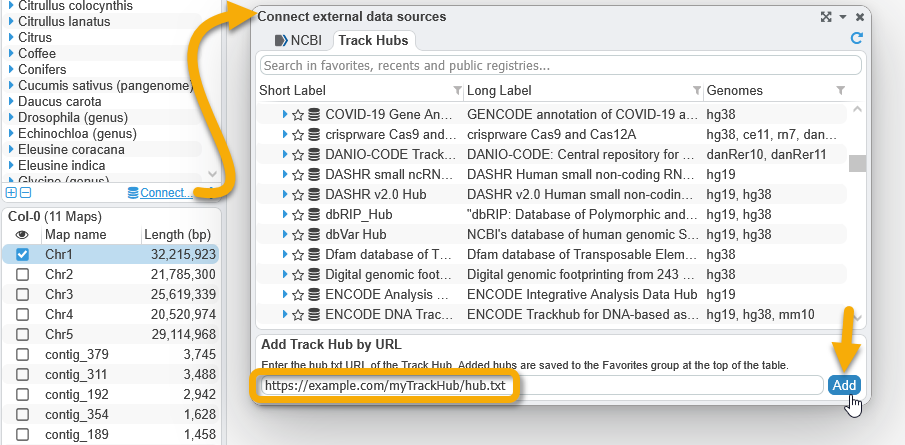
The hub will then appear in Persephone's list of available Track Hubs, under Favorites: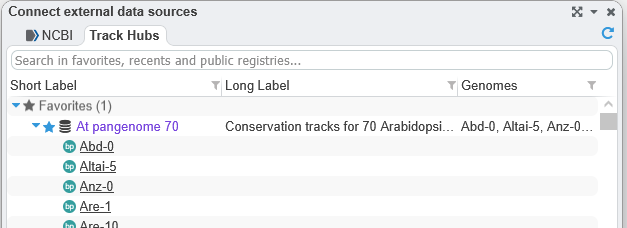
You can learn more about Persephone's handling of Track Hubs here.
Created with the Personal Edition of HelpNDoc: Revolutionize Your Documentation Output with HelpNDoc's Stunning User Interface
 Copyright © 2009-2026 by Persephone Software. All Rights Reserved.