
Handling Sequence Map Sets
A collection of assembly genomic sequences (chromosomes, scaffolds, etc.) form a sequence Map Set.
The logic of working with sequence map sets is described in detail in the corresponding PersephoneShell pages (here and here).
The API includes functions that list, add, edit, and delete map sets. A map set is linked to a particular organism, which should be loaded before adding a map set.
Map sets in Persephone can be of two types: physical (sequences) and genetic. Adding genetic maps is currently implemented in PersephoneShell only (add genetic_map). The functions for handling sequence map sets are nested under MapSet and Sequence branches. Add sequences by the sequence API (addseq reads FASTA files, addseqdb reads GenBank files). The functions for listing, editing, and deleting map sets are common for sequence and genetic map sets (MapSet branch).
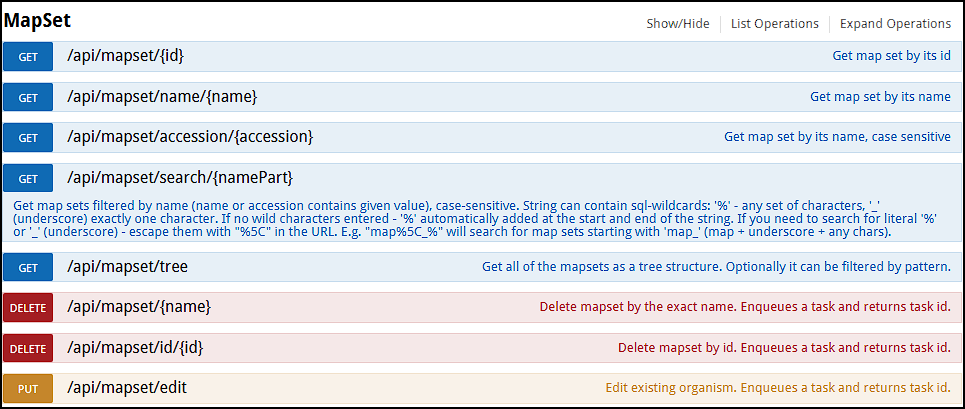

Listing map sets
If you do not know in advance which map sets exist in the database, you can list all of them by using the search API function (/api/mapset/search/{namePart}). To display all entries, use the standard database wildcard symbol '%' as namePart:
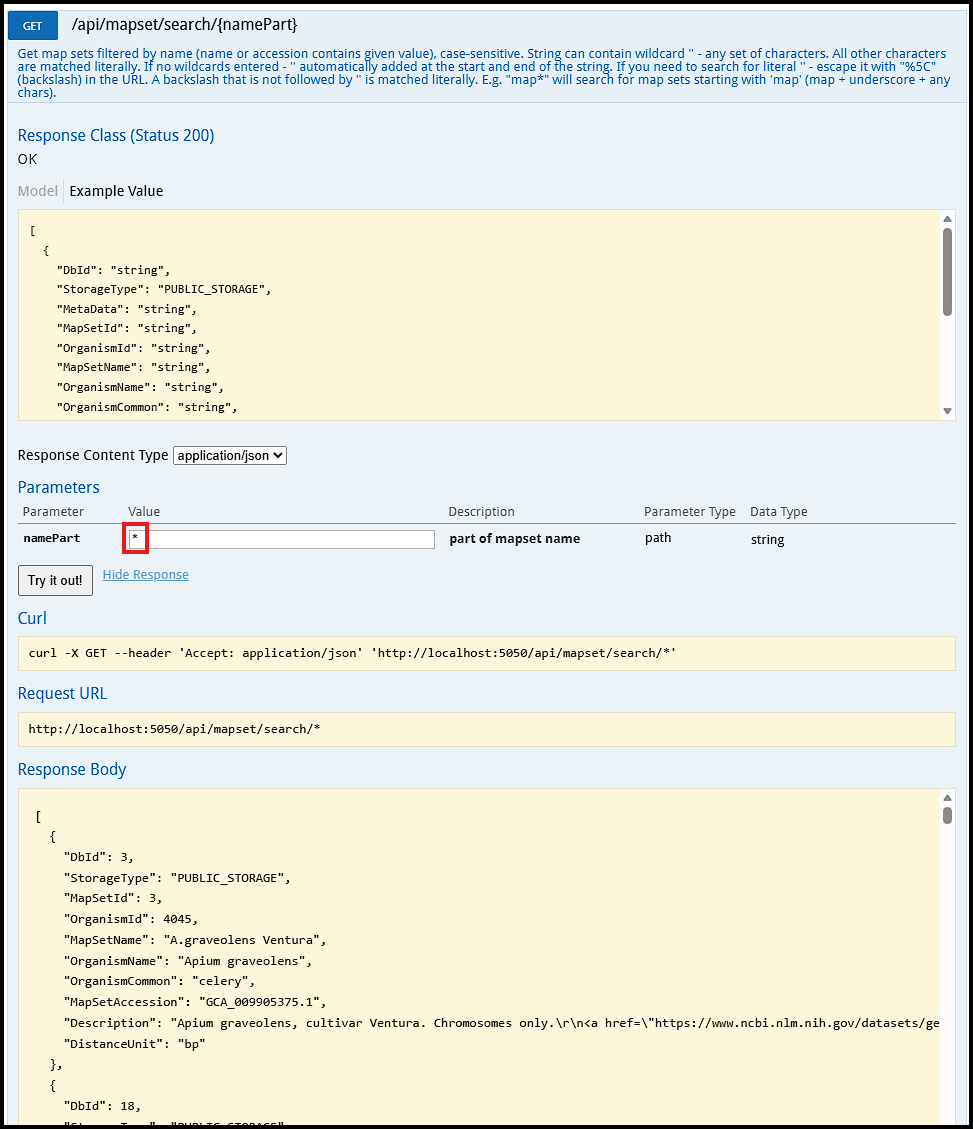
Using other listing functions is straightforward.
Map sets are organized into a tree structure, which can be displayed by using the endpoint /api/mapset/tree. This command will output multiple nodes. Here is one of many nodes in the output:
...
{
"Children": [
{
"MapSetItem": {
"DbId": 157,
"StorageType": "PUBLIC_STORAGE",
"MapSetId": 157,
"OrganismId": 3702,
"MapSetName": "TAIR12",
"OrganismName": "Arabidopsis thaliana",
"OrganismCommon": "thale cress",
"MapSetAccession": "TAIR12",
"Description": "Arabidopsis thaliana TAIR12. \r\nBioSample ID: SAMEA120423002\r\nDescription: Col-CC\r\nComment: Consensus assembly of 13 independent assemblies v. Dec-2022\r\nSubmitter: EBI\r\nENA first public: Feb 2, 2026",
"DistanceUnit": "bp"
},
"NodeId": 189,
"DisplayName": "TAIR12",
"ParentId": 1,
"OrderNo": 0,
"StorageType": "PUBLIC_STORAGE"
}
],
"NodeId": 1,
"DisplayName": "Arabidopsis thaliana",
"OrderNo": 0,
"StorageType": "PUBLIC_STORAGE"
},...
The map set tree consists of nodes, each identified by a NodeId. Some nodes do not contain a map set; they exist purely for organizational purposes and serve as grouping points in the hierarchy. Other nodes do contain map sets. Every map set must be assigned to a specific node in the tree.
It is important to distinguish MapSetId from NodeId. In the listing above, we see a node with NodeId:189 that has a map set TAIR12 attached to it (MapSetId:157). This node’s parent (Arabidopsis thaliana) is NodeId:1. Persephone will display this structure as a map set located under its parent node: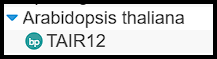
Adding map sets
At this step, we will need more parameters passed to the API. They include OrganismId for the new map set and a Source path to the FASTA file. The path should be accessible by the server. It can be a path to a local file (e.g., /var/data/fasta/myFasta.fa.gz) or a URL (https://ftp.ncbi.nlm.nih.gov/genomes/all/GCA/001/487/895/GCA_001487895.1_Zebrafish_Genome_Assembly_WGS32/GCA_001487895.1_Zebrafish_Genome_Assembly_WGS32_genomic.fna.gz). There are many optional parameters providing a great flexibility in handling the loading process. Let's leave only the required onse for now. We can click on the example box and populate the input field called "config":
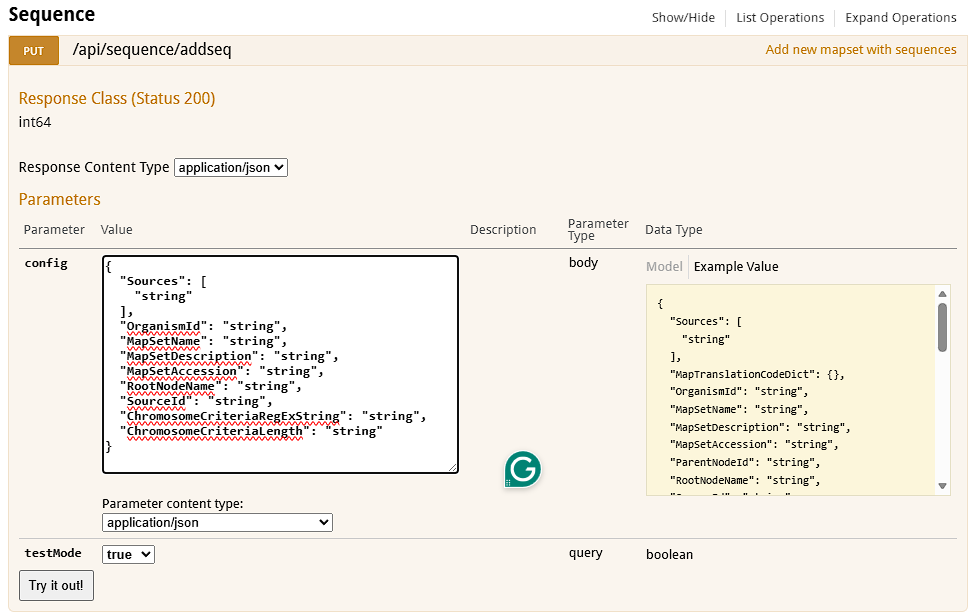
This will show us the format of expected values. Sources will point to the FASTA file, MapSetName will be shown to the end users as the name of the assembly, MapSetAccession is a unique identifier of the map set, RootNodeName is a parent group node name in the map set tree. To separate chromosome sequences from non-chromosomal ones, we need one of criteria - select them by length (ChromosomeCriteriaLength) or by name pattern (ChromosomeCriteriaRegExString). For loading the poplar genome, the input could look like this:
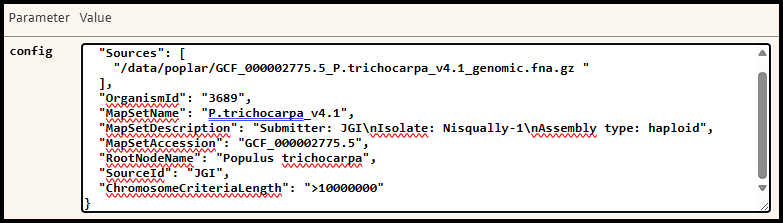
Note that the JSON format does not allow unescaped line breaks in the values. So, to provide the multi-line description we will need to use the line separator '\n'.
Once the config field is filled out, test it by setting testMode to true and, if there are no errors, load the genome by pushing the button Try it out!.
The example above assumes that the FASTA headers are simple and can be used verbatim as map names.
For more complex cases, please consult the documentation for PersephoneShell.
Editing map sets
Deleting map sets
 Copyright © 2009-2026 by Persephone Software. All Rights Reserved.